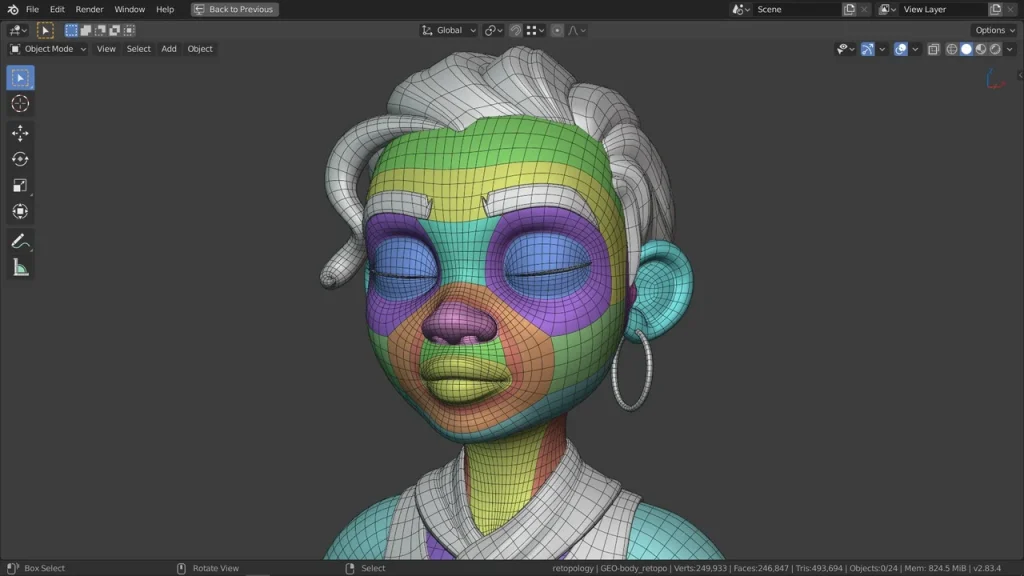
Optimizing 3D assets for games means keeping visual quality while lowering their cost to render. The main tools are sensible polygon budgets, levels of detail (LODs), texture atlases and compression, fewer materials and draw calls, and baked detail in normal maps instead of geometry.
If you do it yourself, our Null Labs tool Null Game Toolkit generates UCX collision meshes and LODs in Blender and batch-exports game-ready FBX.
In the dynamic world of gaming, performance is paramount. Whether you’re developing an AAA title or an indie game, optimizing your models for performance can significantly impact the player experience. From reducing load times to ensuring smooth frame rates, every aspect of optimization counts. In this blog post, we’ll explore some essential tips and tricks for optimizing game models to deliver a seamless and immersive gaming experience.
Polygon Reduction: Polygon reduction is a basic optimization approach for game models. You can cut the polygon count of your models without losing important detail by simplifying the geometry. This procedure can be automated with the use of tools like Blender’s Decimate modifier or third-party programs like Simplygon and Instant Meshes, letting you balance performance and visual accuracy.
LOD (Level of Detail) Implementation: Implementing LODs is crucial for efficiently managing the level of detail based on the distance between the camera and the object. By providing multiple versions of the model with varying levels of detail, you can dynamically switch between them as needed, reducing the rendering workload. Unity and Unreal Engine offer built-in LOD systems that streamline this process, optimizing performance without sacrificing visual quality.
Texture Optimization: Texture optimization plays a major role in game performance. Texture atlases, mipmapping, and texture compression methods (such as DXT, ETC, or ASTC) can help you save GPU resources and limit memory usage. Also consider optimizing texture resolution and removing unnecessary detail to balance visual quality and performance.
Mesh batching and instancing: By grouping several objects into a single batch or instance, these optimization approaches minimize draw calls. This results in a significant reduction of CPU overhead and more effective rendering. Unity and Unreal Engine provide tools and APIs for mesh batching and instancing, so developers can maximize efficiency without sacrificing visual quality. Optimized Animation and Rigging: Good animation and rigging can help games run more smoothly overall. To lessen CPU strain during animation playback, use bone culling, reduce the number of bones per character, and use simple, optimized bone structures. Also consider techniques like skeletal mesh merging to improve rendering and animation efficiency.
Culling Techniques: You can skip rendering objects that are hidden behind other geometry or outside the camera’s field of view by using occlusion culling and frustum culling. Rendering only what the player can see reduces the load on the GPU and boosts efficiency, particularly in detailed scenes. Asset Bundling and Streaming: These two strategies are crucial for performance optimization in massively multiplayer games with vast environments. Your game components should be organized into manageable bundles and loaded dynamically in response to scene requirements or player proximity. This strategy reduces loading times and memory use, facilitating fluid gameplay and exploration.
Related: Game art and animation · BLACKWOOD · A production guide to retopology
05 / Questions
Ask us anythingBefore you
get in touch.
It depends on scope: the number of assets or shots, the level of detail and the delivery formats. We send a quote after reviewing your brief and bill in USD by milestone.
It depends on scope; we confirm a schedule after the brief. Larger or more detailed projects are split into milestones so you can review progress along the way.
Optimized models are usually delivered as FBX or glTF with LODs, baked texture sets and clean UVs, ready for your engine. We confirm the exact formats and specs in the brief so the files fit your pipeline.
You share the source models, target platform and performance budget. We retopologize, bake and set up LODs, test in engine, and hand over the optimized files with notes.
Clients officially own the final files once payment clears. Null Station keeps the right to show the work in its portfolio.